 JR DevTools
Azure DevOps work items in Excel on a Mac
Short answer: the Azure DevOps Excel integration (the Team tab, Open in Excel, Publish and Refresh) is a Windows-only COM add-in. It doesn't exist for Excel for Mac or Excel for the web. You can still get work items into a spreadsheet and back on a Mac; here's how.
1. Export a query to CSV and open it in Excel
Run a query in Boards → Queries, open the … menu and choose Export to CSV. Excel for Mac (or Numbers) opens the file directly. Add columns to the query first with Column options, including Parent if you need the parent ID on each row.
Watch out: rich-text fields such as Description are exported as raw HTML, and the export is a snapshot. Nothing links it back to Azure DevOps.
2. Import your changes back with CSV
Save the edited sheet as CSV (UTF-8) and import it with Boards → Work items → Import Work Items. Rows with an ID update existing work items; rows without one create new items. Keep the ID and Work Item Type columns, and remove columns you didn't change so you don't overwrite fields by accident.
Two things to know: errors only show up during the import, and the import doesn't check whether someone changed a work item after you exported it. Their change is overwritten.
3. Change many items to the same value: bulk edit
For "move these 40 items to the next sprint", you don't need a spreadsheet at all. Select the items in a query or backlog, open the context menu and choose Edit to set one or more fields for all of them.
4. Edit in a spreadsheet grid in the browser
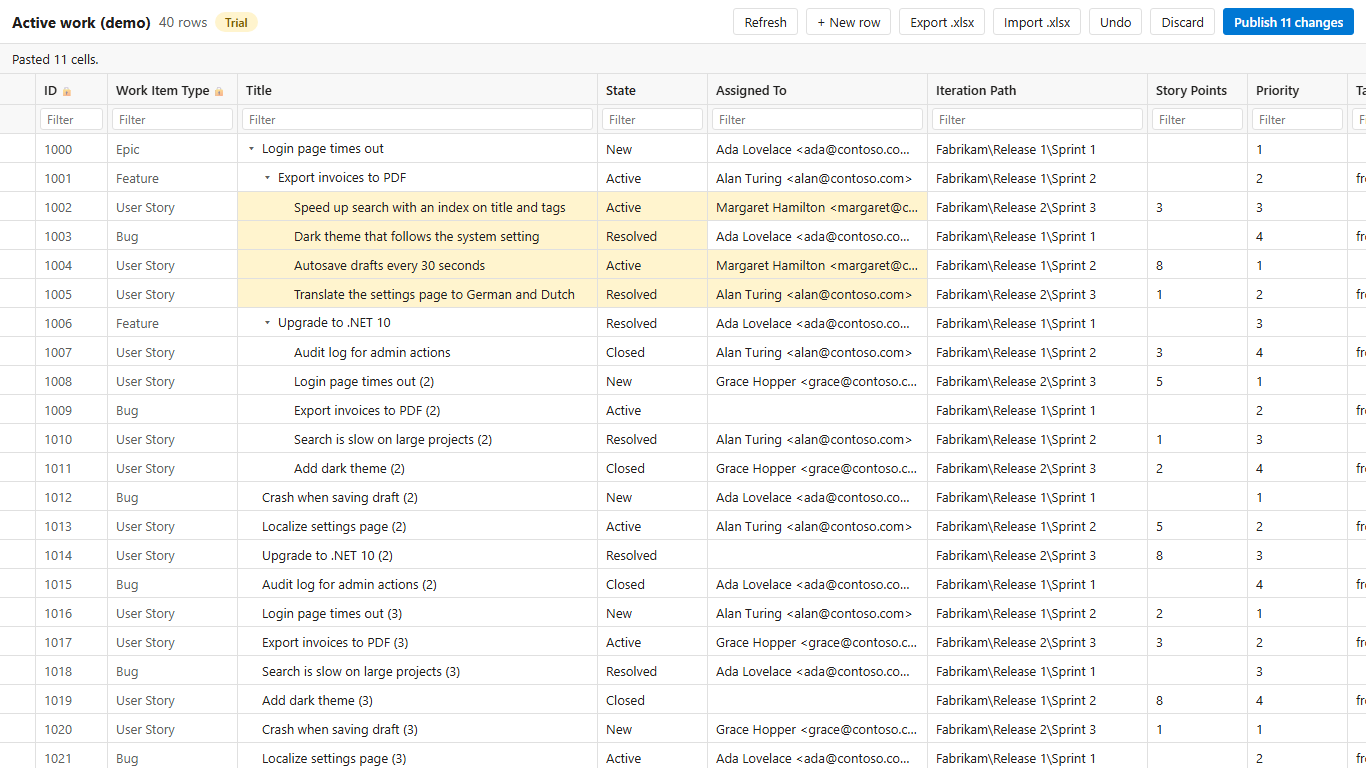
If you want the spreadsheet experience without the round trip, Bulk Editor (made by us) opens a query or backlog selection in an editable grid inside Azure DevOps Services, so it works the same on a Mac, Windows or Linux:
- type in cells or paste a block copied from Excel for Mac;
- pick lists, required fields and area/iteration paths come from your process, and invalid values are flagged before you publish;
- a row that someone else changed in the meantime is refused instead of overwritten;
- export a clean .xlsx without HTML tags, and (Pro) import it back.
There's a free plan of 25 published work items per organization per month and a 14-day Pro trial.
Which one should I use?
| You want to … | On a Mac, use |
|---|---|
| Share or analyse a list of work items | Export to CSV |
| Set one field to the same value on many items | Bulk edit in the query |
| Create a few hundred items once | CSV import |
| Edit different values per row, regularly | A grid in the browser |
Also on Windows and the add-in gives you trouble? See Azure DevOps Excel add-in not working.