
Bulk Editor for Azure DevOps
The browser-based alternative to Open in Excel. Edit work items in bulk in a spreadsheet-like grid, right in Azure DevOps: no Office add-in, no Visual Studio, no COM errors, and it works on Windows, Mac and Linux.
Install free from the Marketplace Pricing
14-day Pro trial starts automatically. No account and no credit card needed.
Coming soon to the Visual Studio Marketplace. Want early access, or to be told when it's available? Email support@jr-devtools.com.
Features
Edit like a spreadsheet
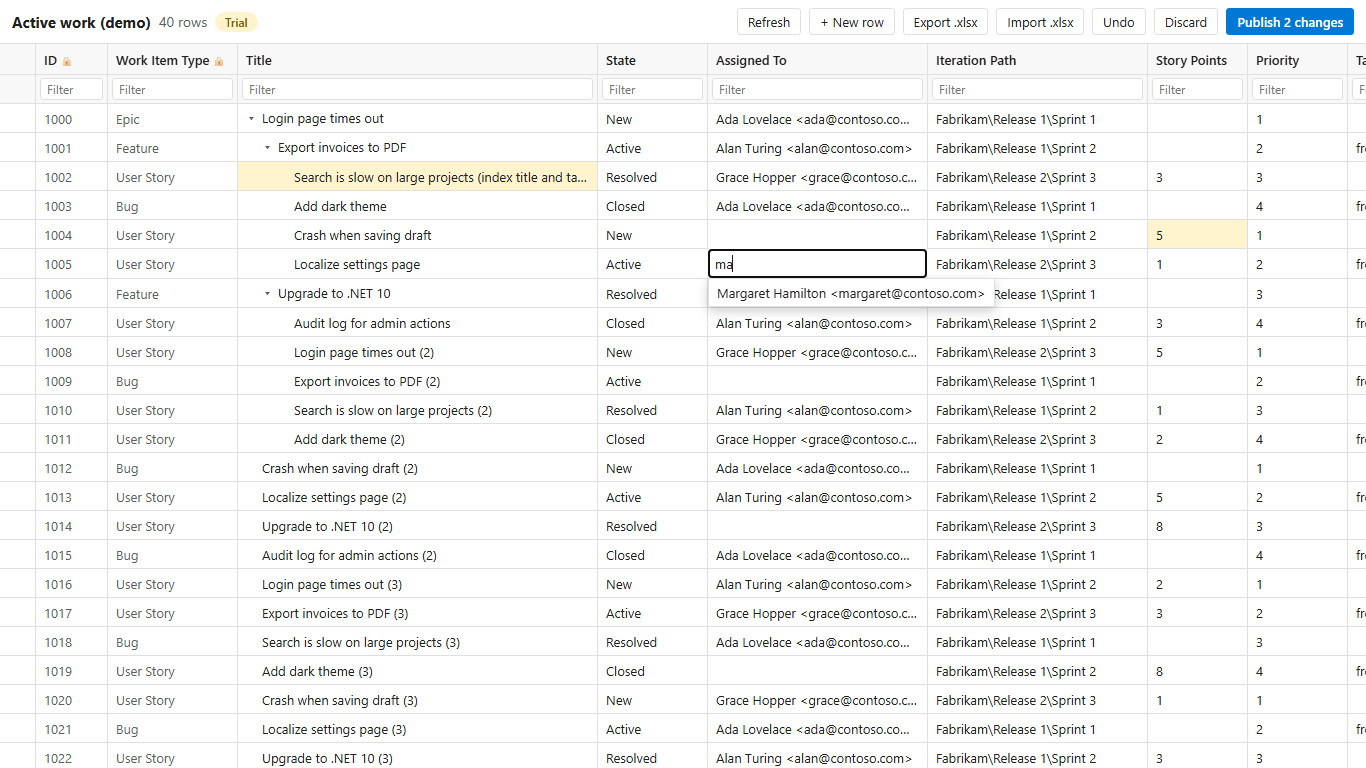
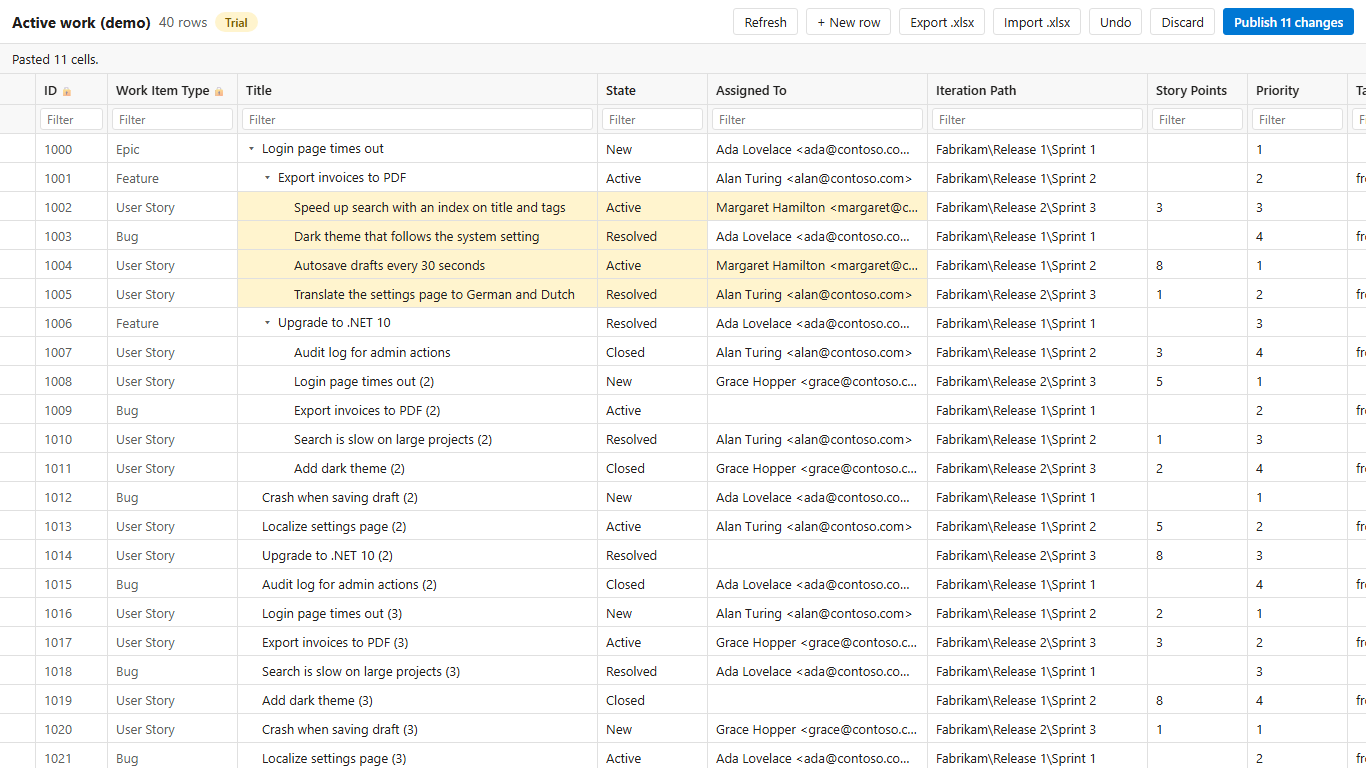
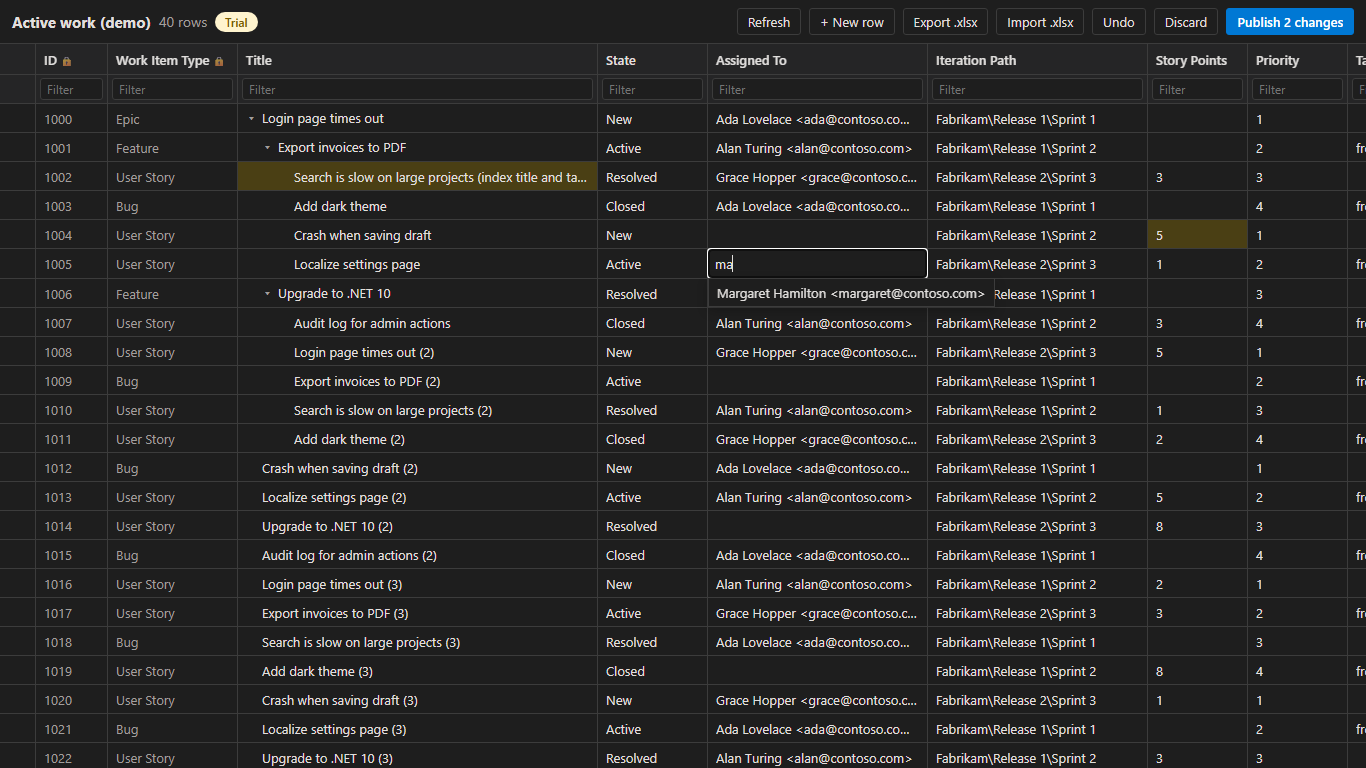
Open a query, a backlog selection or any list of work items in a grid and type. Enter and Tab move on, Ctrl+V pastes a block copied from Excel, Ctrl+Z undoes. Nothing is saved until you select Publish.
Your process, your fields
Pick lists, required fields, states, and area and iteration paths come from your own process, including custom fields and inherited processes.
Nothing gets overwritten
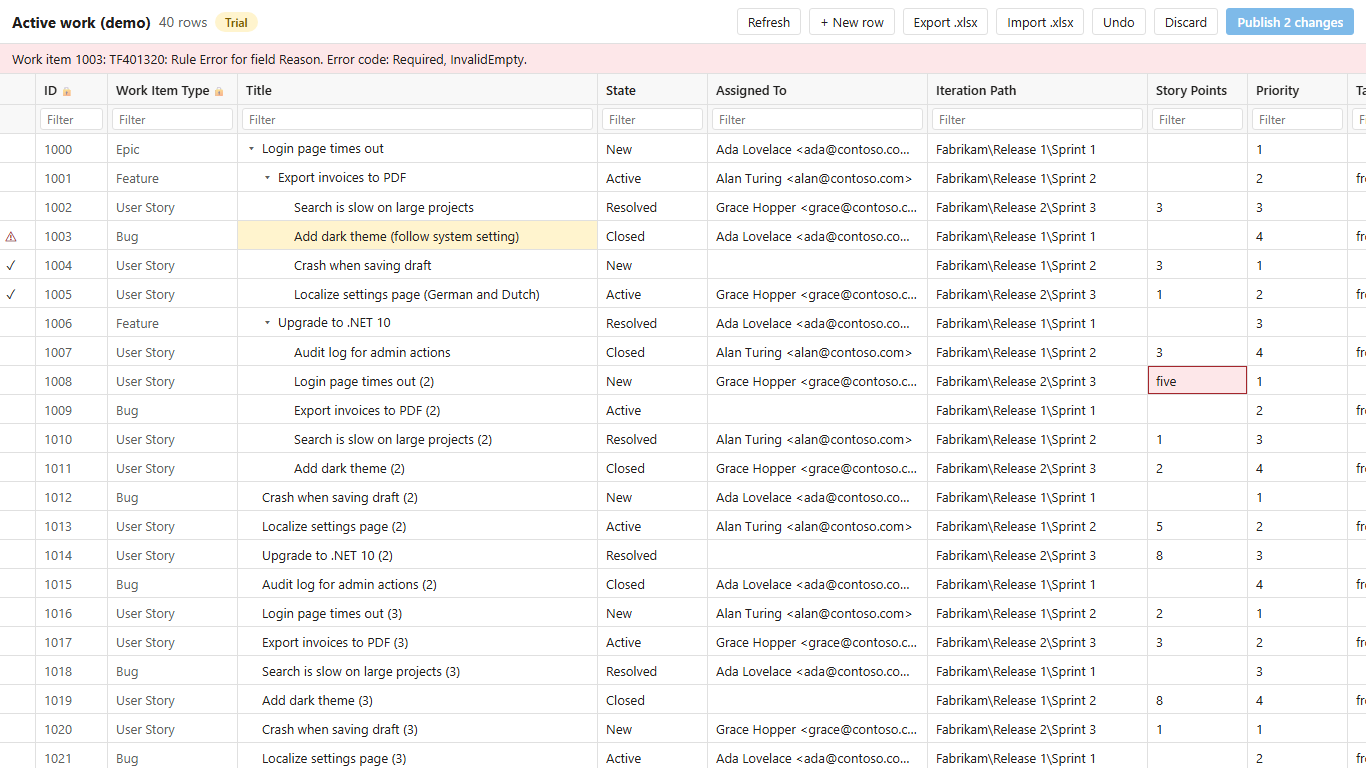
If someone changed a work item since you opened it, that row is refused and your edit is kept. Every error is shown on its row, with the reason.
Excel round trip
Export to .xlsx with clean text (no HTML tags), edit in Excel, and import it back. Only real changes are applied; rows without an ID become new work items.
Sort, filter and hierarchy
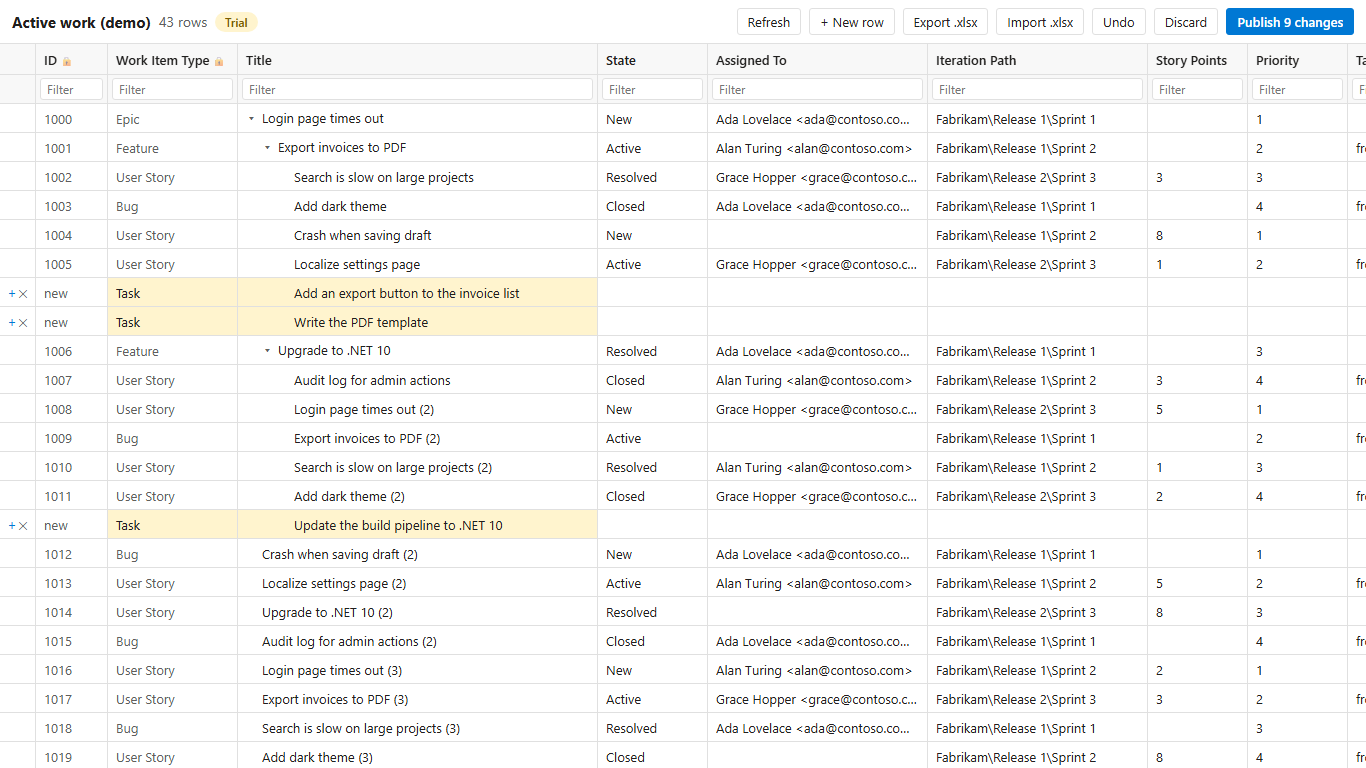
Sort and filter any column. Tree queries show as a collapsible tree where you add children and change parents.
People, paths and tags
Search people for Assigned To, pick area and iteration paths, and choose from the tags already used in your project.
Your formatting is safe
Descriptions with bold text, links, lists or images are never flattened: the grid leaves them to the work item form, and tells you why.
Fast with thousands of rows
Only the rows in view are drawn, so large queries stay responsive. Works in the light and dark theme.
How it compares
| Bulk Editor | Open in Excel | Built-in CSV export/import | |
|---|---|---|---|
| Nothing to install on your computer | ✔ | Office add-in and Visual Studio components | ✔ |
| Works on Mac and Linux | ✔ | Windows only | ✔ |
| Edit right in Azure DevOps | ✔ | In Excel | In a separate file |
| Pick lists and validation while editing | ✔ | ✔ | Only when importing |
| Warns before overwriting someone else's change | ✔ | ✔ | – |
| Formatting in rich-text fields is kept | ✔ | Lost when publishing from Excel | HTML tags in the export |
| Tree queries and parents | ✔ | ✔ | Parent ID only |
| Sort, filter, paste blocks | ✔ | ✔ (Excel) | ✔ (Excel) |
Security and privacy
- Permissions: work items read & write only (
vso.work_write). No access to code, builds or pipelines. - Your permissions apply: people can only change what they're allowed to change in Azure DevOps; area path and field rules are enforced by Azure DevOps itself.
- Full audit trail: every change is a normal work item revision, in the name of the person who published it.
- Your data stays in Azure DevOps: the extension runs in your browser and talks only to your organization's REST API. Excel files are created and read in your browser. There is no server of ours and no telemetry. The only external call is the license check with Lemon Squeezy (about once a week), which sends the license key and your organization name and ID, never work item data.
- Made in the Netherlands (EU). See the privacy policy.
Pricing
Free
- The grid, validation, sort and filter, paste and undo
- Export to Excel
- Publish changes to 25 different work items per organization per month
Pro · monthly
- Unlimited publishing
- Import from Excel
- Create work items and children, change parents
- All projects, any number of users
Pro · yearly
- Everything in Pro monthly
- 2 months free
- The free limit counts different work items: changing the same item again in the same month doesn't count twice.
- Every organization gets a 14-day Pro trial automatically. No credit card needed. After the trial you continue on Free; nothing is lost.
- Invoices are sent by Lemon Squeezy. Need a purchase order or several organizations on one invoice? Email support@jr-devtools.com.
- Pro can be bought when the extension is available on the Marketplace.
- Prices exclude VAT/sales tax, which is added at checkout where applicable. Payments are processed by Lemon Squeezy, our Merchant of Record.
Get started
- An organization admin (Project Collection Administrator) installs the extension from the MarketplaceVisual Studio Marketplace (coming soon).
- On the Queries page, open the ⋮ menu above the results and select Open in Bulk Editor, or select work items in a backlog or query and choose Open in Bulk Editor from the context menu. You can also open Boards → Bulk Editor directly.
- Edit, review the highlighted changes and select Publish.
- After buying Pro, an admin enters the license key under Organization settings → Extensions → Bulk Editor.
FAQ
Azure DevOps can already edit several work items at once. Why this?
The built-in bulk edit sets the same value on every selected work item. The grid lets every row have its own value: re-estimate a sprint, reassign a backlog or rename twenty items in one pass, or paste a whole column from Excel, and review everything before you publish.
Does it work with our custom fields and process?
Yes. Fields, pick lists, required fields and states are read from your process.
Can I edit work items from several projects?
Yes, if your query spans projects. New work items are created in the project you opened the Bulk Editor from.
Who can use it?
Anyone who can edit work items in Azure DevOps. What someone may change is decided by Azure DevOps, exactly as in the work item form.
What if we make a mistake in a bulk change?
Before publishing: Undo, or Discard. After publishing: every change is a normal revision, visible in the work item history.
Is Azure DevOps Server (on-premises) supported?
Not yet; it's planned. Email us with your server version to join the early access.
What are the known limitations?
- Formatted rich text is read-only in the grid (plain descriptions can be edited).
- State changes follow your process rules: a transition your process doesn't allow is refused and shown on that row.
- Links other than parent/child (related, predecessor/successor, …) are not edited in the grid.
- Up to 5,000 work items per grid.
About
Made by an independent developer who uses Azure DevOps every day, also the maker of Merge Conflict Resolver. Questions get an answer from the developer within 2 business days: support@jr-devtools.com.
Release notes
Early-access builds before the first public release.
0.0.3 · September 2026
- Paste a block from Excel, undo, sort and filter every column; Enter and Tab move to the next cell.
- Tree queries, changing parents, new work items and children; import from Excel can create work items.
- People search, area and iteration path search, tags from your project.
- Formatted descriptions are protected; queries with @CurrentIteration; a warning before leaving with unpublished changes.
0.0.1 – 0.0.2 · September 2026
- First builds: grid on queries and backlogs, validation from the process, publish with conflict detection, Excel export and import.