Merge Conflict Resolver for Azure DevOps
Resolve pull request merge conflicts without leaving Azure DevOps, and without crashes, lost work or mangled characters.
Install from the Marketplace Pricing
Features
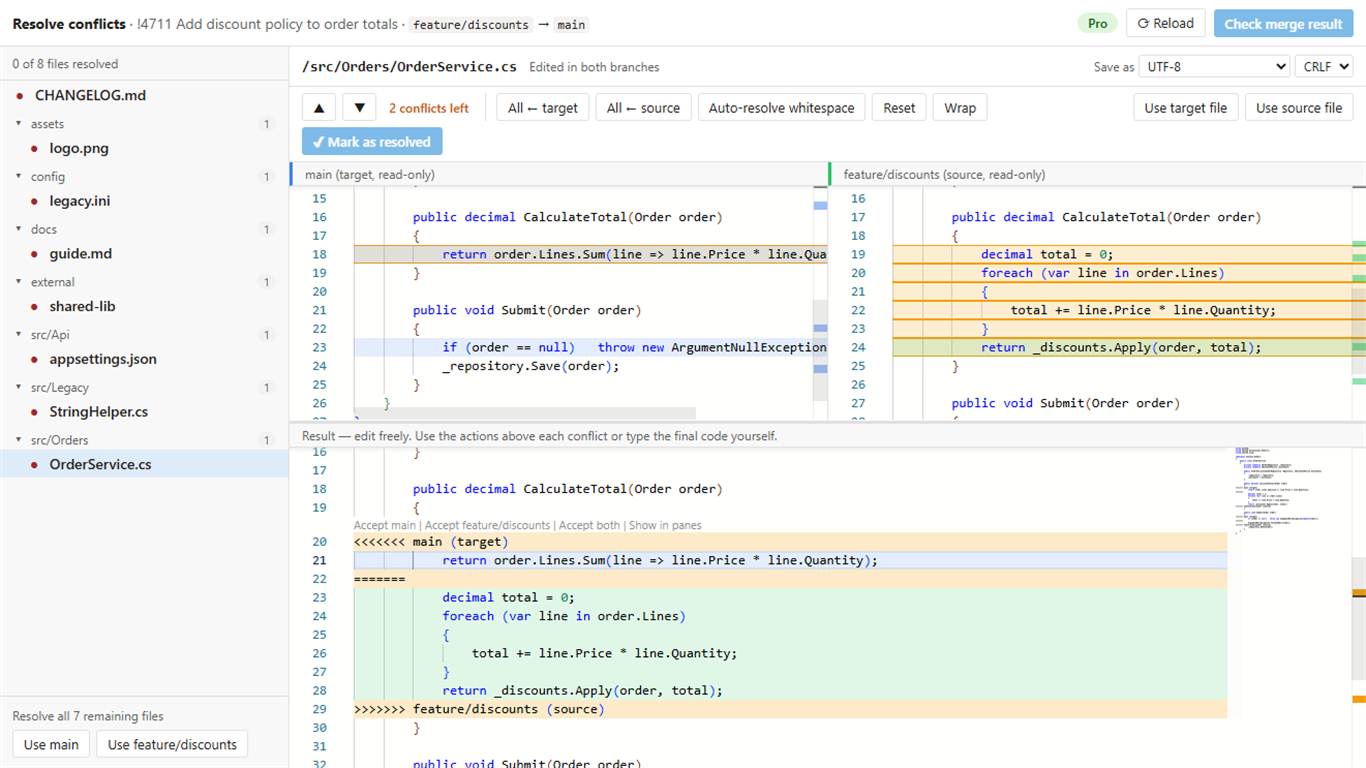
3-way editor
Target, source and result side by side. Non-conflicting changes merge automatically; Accept target / source / both above every conflict.
Never lose work
Every edit is saved as a local draft and restored after a reload or browser crash.
Correct encodings
UTF-8 (with or without BOM), UTF-16 and Windows-1252/ANSI are detected and written back byte for byte, including CRLF/LF.
Every conflict type
Edit/edit, add/add, edit/delete, renames, path conflicts, binary files and submodules.
Fast on big pull requests
Hundreds of conflicts, multi-megabyte lockfiles and very long lines stay responsive.
Commit to the source branch (Pro)
Put the resolution in the pull request's own history, so reviewers, builds, policies and local clones see it.
Pricing
Free
- 10 pull requests per organization per month
- All editor features and conflict types
Pro · monthly
- Unlimited pull requests, any number of users
- Commit the resolution to the source branch
- Bulk resolve and whitespace auto-resolve
Every organization gets a 14-day Pro trial automatically. Prices exclude VAT/sales tax, which is added at checkout where applicable. Payments are processed by Lemon Squeezy, our Merchant of Record. Need an invoice or purchase order? Email support@jr-devtools.com.
Get started
- An organization admin installs the extension from the Marketplace.
- Open a pull request with conflicts and select the Resolve conflicts tab.
- Resolve each file; when the last one is done, Azure DevOps creates the merge with your resolutions.
- With Pro, select Commit to <source branch>, then complete the pull request as usual.
- After buying Pro, an admin enters the license key under Organization settings → Extensions → Merge Resolver.
Your code stays in Azure DevOps
The extension runs in your browser and talks only to your organization's Azure DevOps REST API. The only external call is the license check with Lemon Squeezy, which sends the license key and your organization name, never your code. See the privacy policy.