 JR DevTools
Conflicts tab not loading, slow or crashing in Azure DevOps
The Conflicts tab on your pull request stays blank, shows a spinner forever, or says “Pull Request Merge Conflict Extension is taking longer than expected to load.” Here is which extension adds that tab, the causes people actually report, what to try in order, and what to do when nothing helps.
Install from the Marketplace See how it works Watch the 1-minute video
Which extension adds the Conflicts tab?
Azure DevOps tells you a pull request has merge conflicts, but its own message only says to resolve them and push
to the source branch. The tab called Conflicts is added by an extension, almost always Microsoft's
DevLabs Pull Request Merge Conflict Extension (ms-devlabs.conflicts-tab). Its last update was
in November 2023 and Microsoft says there are no development resources for it, so a problem with it is unlikely
to be fixed. To see what is installed, open Organization settings → Extensions.
If the Overview tab itself says “Checking for merge conflicts” and never finishes, the problem is the conflict check and not the tab. See pull request stuck on “Checking for merge conflicts”.
Why the tab doesn't load
These causes come from the extension's own Marketplace Q&A and reviews, not from Microsoft documentation.
- Just slow. The message “taking longer than expected to load” appears while the extension's large bundle loads. Microsoft's answer in the Q&A: if it loads eventually there is no problem; if it never does, there is one.
- The browser. Several reports of an endless spinner in Firefox while Chrome and Edge work.
- One conflict the tab can't draw. Microsoft said that submodule conflicts are not supported, and a release in September 2023 blanked the tab on pull requests with an edit/delete conflict until it was patched. One such file can blank the tab for the whole pull request.
- A very large pull request. Reports of a hang when loading around 45 conflicts, and of
freezes on big files such as
package-lock.json. On very large files or many conflicts the DevLabs tab can freeze the browser tab. - The “Use beta resolver” setting. One user who switched it on reported that the tab then never loaded for any pull request, which also hides the setting needed to switch it off again.
- Azure DevOps Server: a tab that stopped loading after an extension update on an old TFS or Azure DevOps Server version, and requests blocked as mixed content because the page is on HTTPS while the extension called the API over HTTP.
Fixes, in order
1. Wait a few seconds, then hard refresh
If the message disappears and the tab appears, nothing is wrong. If not, do a hard refresh.
2. Try another browser or a private window
Chrome or Edge, and a private window without browser extensions. One user fixed a freeze on a large repository by waiting a few minutes or opening the page in a private window.
3. Look at the console
Press F12, open Console, reload the tab and note the first red error. That is what Microsoft
kept asking reporters for. An error that mentions a resolver (for example ResolverProps or
gitObjectType) points to a conflict type the tab can't draw, not to your network. A blocked request
about mixed content points to an HTTP/HTTPS mismatch on Azure DevOps Server.
4. Check whether it is only this pull request
If the tab loads on other pull requests, the cause is in this pull request's conflicts: a submodule, an edit/delete conflict, or a huge file. Resolve those locally (step 7).
5. Switch off “Use beta resolver”
Only if you switched it on. In the Q&A, Microsoft suggested two ways back: open a pull request that has an edit/delete conflict (it doesn't use the beta resolver, so the tab loads and you can reach the setting), or delete the stored setting through the Extension Management REST API.
6. Disable or reinstall the extension
An organization admin can do this under Organization settings → Extensions; Microsoft explains how in Uninstall or disable an extension. One user reported having to reinstall it every day to get the tab back.
7. Skip the tab and resolve locally
Merge the target branch into the source branch on your own machine. This works whatever is wrong with the tab,
and once the conflict is gone there is nothing left for the tab to show. Replace
feature/my-branch and main with your source and target branch.
git fetch origin
git checkout feature/my-branch
git pull
git merge origin/main
# resolve any conflicts Git reports, then:
git add .
git commit
git push
The push starts a new test merge on the pull request. More detail in how to resolve merge conflicts in an Azure DevOps pull request.
If nothing works: a tab that is maintained
Merge Conflict Resolver (made by us) is an independent extension that adds a Resolve conflicts tab to every pull request, with a 3-way merge editor in the browser:
- Hundreds of conflicts and multi-megabyte lockfiles stay responsive.
- Drafts are saved in the browser, so a reload or crash doesn't lose work.
- Edit/delete conflicts, renames, binary files, Git LFS files and submodules each get a clear choice.
- If something fails, the tab shows a plain-language message and a Copy details for support button. Questions are answered within 2 business days.
It supports Azure DevOps Services (dev.azure.com) and Azure DevOps Server 2022 or later; see Azure DevOps Server. On Server, submodule conflicts are resolved locally: the tab explains the Git commands. There is a free plan (10 pull requests per organization per month, all conflict types) and a 14-day Pro trial. It can be installed next to the DevLabs extension, so you can try it before you remove anything.
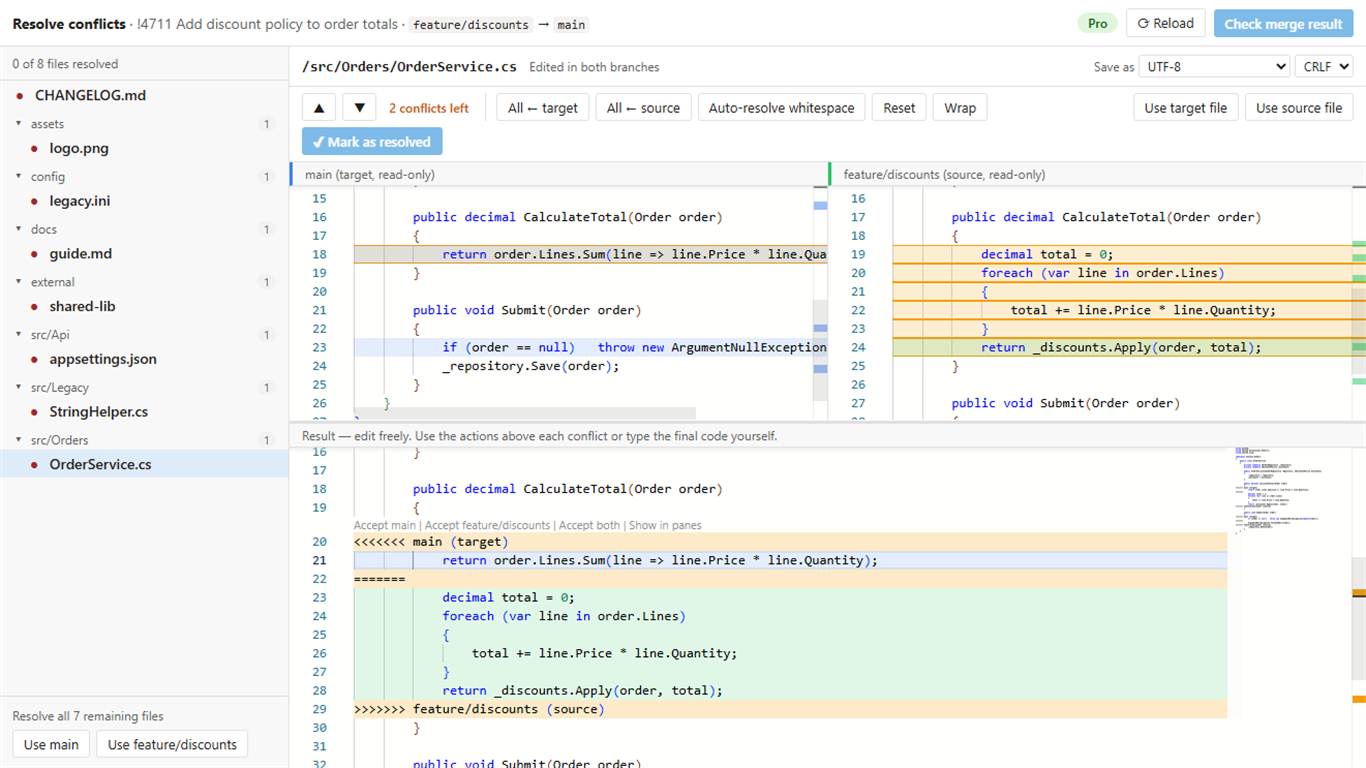
If our tab shows only “Merge Conflict Resolver is turned off for pull requests into …”, an organization admin has limited the tab to other target branches. It can be changed under Organization settings → Merge Conflict Resolver.
Install from the Marketplace See how it works
Related guides
- Azure DevOps pull request stuck on “Checking for merge conflicts”
- How to resolve merge conflicts in an Azure DevOps pull request
- Alternatives to the DevLabs Pull Request Merge Conflict Extension
- Merge Conflict Resolver: features, pricing and free plan
- Can't complete an Azure DevOps pull request after resolving conflicts