 JR DevTools
Alternatives to the DevLabs Pull Request Merge Conflict Extension
For years, the free Pull Request Merge Conflict Extension from Microsoft DevLabs
(ms-devlabs.conflicts-tab) was how teams resolved conflicts without leaving Azure DevOps. It is no
longer maintained. Here's what's going on and what you can use instead.
Disclosure: we make Merge Conflict Resolver, one of the options below. We've tried to keep this comparison fair; corrections are welcome at support@jr-devtools.com. Last checked: October 2026.
Is the DevLabs extension still supported?
No. Its last update was in November 2023, and Microsoft wrote in the extension's Q&A that “there are no current development resources for this extension”. Questions like “Is this even supported anymore?” go unanswered. Since 2024 its reviews average about 1.6 out of 5. The most reported problems:
- the tab freezes or keeps “taking longer than expected to load”, and work is lost when it crashes;
- non-ASCII characters (ä, é, č, Hebrew, Chinese …) are changed, especially in UTF-8 and ANSI files;
- you can only take a whole file from one side, not choose per conflict or keep both;
- the resolution lives only in the pull request's merge commit, so reviewers and builds never see it;
- large files such as
package-lock.json, or many conflicts, make it hang.
It still works for some teams on simple conflicts, so there's no need to remove it in a hurry. But if you run into the problems above, there won't be a fix.
The alternatives
1. Resolve locally with Git (free)
Merge the target branch into your source branch, resolve in your editor, and push. See our step-by-step guide.
Good: free, always works, you can build and test before pushing. Less good: you need the repository cloned and a working Git setup; slow for a two-line fix or for someone else's pull request.
2. Your IDE's Git integration (free)
Visual Studio, VS Code and JetBrains IDEs all have 3-way merge editors. In Visual Studio, check out the source branch, merge the target branch from Git → Manage Branches, and resolve in the merge editor.
Good: comfortable editor with IntelliSense. Less good: same as locally: you need a clone, and it's per developer, not something a reviewer can do from the pull request.
3. Merge Conflict Resolver (free plan, Pro from $12 per organization per month)
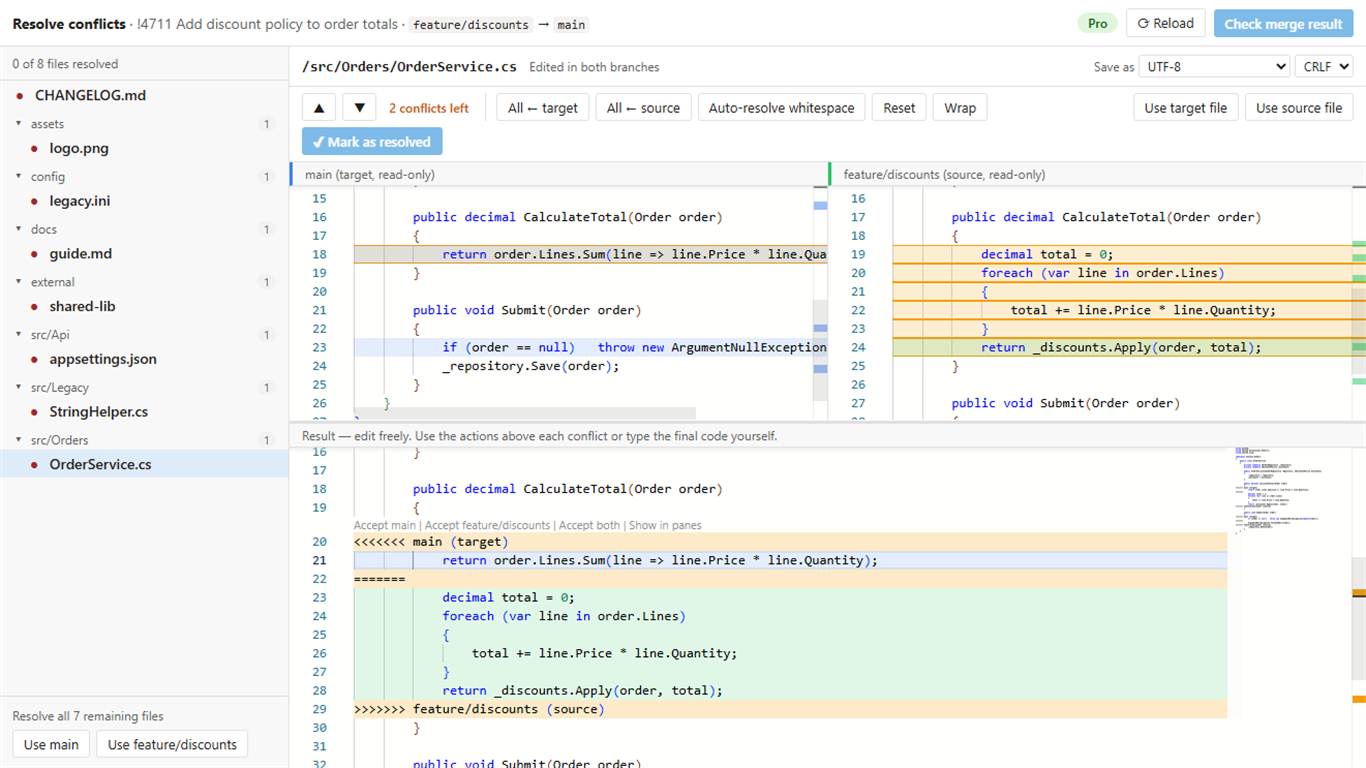
Merge Conflict Resolver is an independent, actively maintained extension that adds a Resolve conflicts tab to pull requests, built to fix the problems above:
- 3-way editor (Monaco, the editor of VS Code) with Accept target / source / both per conflict;
- drafts are saved in the browser, so a reload or crash never loses work;
- UTF-8, UTF-8 with BOM, UTF-16 and Windows-1252 files and their line endings are written back byte for byte;
- edit/delete, renames, binary files, Git LFS and submodules each get a clear choice;
- stays responsive with hundreds of conflicts and multi-megabyte lockfiles;
- Pro: commit the resolution to the source branch, a summary comment on the pull request, bulk and whitespace auto-resolve.
Good: no clone needed, anyone on the pull request can resolve. Less good: Azure DevOps Services only for now (not Azure DevOps Server); Pro is paid. The free plan covers 10 pull requests per organization per month, and every organization gets a 14-day Pro trial.
Side by side
| DevLabs extension | Locally / IDE | Merge Conflict Resolver | |
|---|---|---|---|
| Resolve in the pull request, no clone | ✔ | – | ✔ |
| Choose per conflict | Whole file only | ✔ | ✔ |
| Work survives a reload or crash | – | ✔ | ✔ |
| Encodings kept intact | Reported to break | Depends on editor | ✔ |
| Reviewers and builds see the resolution | – | ✔ | ✔ (Pro) |
| Maintained | No (last update 2023) | ✔ | ✔ |
| Price | Free | Free | Free plan; Pro $12/month per organization |
Switching from the DevLabs extension
Both extensions can be installed side by side, so you can try before you remove anything. An organization admin installs Merge Conflict Resolver from the Visual Studio Marketplace; there's nothing to configure, and the 14-day Pro trial starts the first time someone opens the tab.